
Patch My PC Home Updater Overview
Our Home Updater is a free, easy-to-use program that keeps over 300 applications up-to-date on your computer. It is an easy way to update or install a large list of programs on to your computer.
A key component of staying safe online is keeping your computer up-to-date. Hackers love targeting outdated software. Outdated software often contains security vulnerabilities, bugs, and other issues that are often resolved in the latest version. These are some of the reasons why it’s essential to keep the apps updated (or “patched”).
When you open Patch My PC Updater, it will scan your system for outdated programs.
- Outdated programs will be shown in – Red
- Updated programs will be shown in – Green
- Not-installed programs will be shown in – Black
Whether you are a computer novice, semi-tech savvy, the go-to tech person for your family and friends, or an IT professional, Patch My PC’s Home Updater will make patching your PC easy.
Patch My PC Home Updater Download
Click the button below to download the latest version.
Here’s How It Works
 Features of Patch My PC Home Updater
Patch My PC Home Updater Features
- Updates over 300 common apps check ✔ including portable apps
- Ability to cache updates for use on multiple machines
- No bloatware during installations
- Applications install/update silently by default no install wizard needed
- Optionally, disable silent install to perform a manual custom install
- Easy to use user interface
- Installs 64-bit apps by default on 64-bit windows
- Optionally choose to install 32-bit apps on 64-bit Windows
- Change updated and outdated apps color for color blindness
- Option to automatically kill programs before updating it
- Portable and only about 1.5MB
- Create a baseline of applications if installing on new PC’s
- Quickly uninstall multiple programs
- Scan time is usually less than 1 second
- Set updates to happen on a schedule
- Skip updates for any application you don’t want to update
- Suppresses restarts when performing application updates

Community Support
The Patch My PC community provides free support to our users on our support forum.

Stay Secure

Save Time
Save time by automating the installation and updating of over 300 applications!

Portable

Quality Testing
 Watch The How to Guides for the Home Updater
If you’re a PC user only using a few computers, the guide below will show you the basics of using our software.
If you’re an IT Pro using our software on multiple computers often, please review the more technical guide below showing advanced options.
Home Updater Supported Products List
Patch My PC Home Updater supports installing and updating ~250 applications! The list below will show every application that we support installing, detecting, and auto-updating. We are always looking to expand our support product list drop us a note on our forum if you want to see a new application added.
You can always request more to be added using our vote for new applications page.
- 360 Total Security
- 7-Zip
- 8 Gadget Pack
- Adobe Acrobat Reader DC
- Adobe Air
- Advanced IP Scanner
- Advanced SystemCare
- Advanced Uninstaller PRO
- AIMP
- Amazon Music
- Angry IP Scanner
- AnyDesk
- Atom
- Audacity
- Auslogics Disk Defrag
- AutoHotkey
- Autorun Organizer
- Avast Free Antivirus
- AVG Free Antivirus
- Bandizip
- Bitdefender Anti-Ransomware
- BleachBit
- Blender
- BOINC
- Brackets
- Brave
- CamStudio
- Calibre
- CCleaner
- CDBurnerXP
- Classic Shell
- CMake
- Code::Blocks
- Copy Handler
- Core FTP LE
- CPU-Z
- CrystalDiskInfo
- CrystalDiskMark
- DavMail
- Discord
- DiskCheckup
- DoNotSpy11
- Driver Booster
- Driver Easy
- Dropbox
- EA App
- EditPad Lite
- eM Client
- eMule
- Etcher
- Evernote
- Everything
- Exact Audio Copy
- FastStone Image Viewer
- FileZilla Client
- Foobar2000
- Foxit Reader
- Free Studio
- Freemake Video Converter
- Freeplane
- Frhed
- GIMP
- Git
- GitHub Desktop
- Glary Utilities
- GlassWire
- GOG Galaxy
- GOM Player
- Google Backup & Sync
- Google Chrome
- Google Earth Pro
- Gpg4win
- Greenshot
- HandBrake
- HashTab
- Heidi Eraser
- HostsMan
- Hotspot Shield
- HWiNFO32
- HWiNFO64
- HWMonitor
- iCloud
- ImageGlass
- ImgBurn
- Inkscape
- IObit Malware Fighter
- IObit Smart Defrag
- IObit Uninstaller
- IrFanView
- iTunes
- Java 8 (JRE) (x64)
- Java 8 (JRE) (x86)
- jetAudio Basic
- K-Lite Mega Codec Pack
- KC Softwares SUMo
- KeePass
- LibreCAD
- LibreOffice
- LMMS
- Logitech SetPoint
- Malwarebytes
- Maxthon
- Media Monkey
- Media Player Classic – Home Cinema
- MediaInfo
- Microsoft Visual C++ 2015-2022 Redistributable (x86)
- Microsoft Visual C++ 2015-2022 Redistributable (x64)
- MKVToolNix
- Mozilla Firefox
- Mozilla Firefox ESR
- Mozilla Thunderbird
- MP3Tag
- mRemoteNG
- MSI Afterburner
- Multi Commander
- MyPhoneExplorer
- Mumble
- MusicBee
- MusicBrainz Picard
- Nextcloud
- NotePad++
- NoteTab Light
- NVDA Screen Reader
- Nvidia Physx
- OBS Studio
- OpenOffice
- OpenShot Video Editor
- OpenVPN
- Opera
- OwnCloud
- Paint.NET
- Pale Moon
- PDFedit
- PDF Split and Merge
- PDF-XChange Viewer
- PDF-XChange Editor
- PeaZip
- PicPick
- Pidgin
- PNotes
- PotPlayer
- Privacy Eraser
- PrivaZer
- Process Hacker
- Process Lasso
- Progress Telerik “Fiddler“
- ProtonVPN
- PureSync
- PuTTY
- qBittorrent
- Reg Organizer
- Registry Life
- Resilio Sync
- Revo Uninstaller
- RogueKiller
- RStudio
- SABnzbd
- Samsung Kies 3
- SandBoxie
- SFXMaker
- ShareX
- Simple System Tweaker
- Skype
- SMPlayer
- Soft Organizer
- SpeedCrunch
- Spybot: Search & Destroy
- Steam
- Stereoscopic Player
- Subtitle Edit
- SumatraPDF
- SUPERAntiSpyware
- SyncBackFree
- TeamSpeak 3 Client
- TeamViewer
- Telegram
- TeraCopy
- TortoiseSVN
- TreeSize Free
- Ubisoft Connect
- Ultra Defragmenter
- UltraSearch
- Unchecky
- Unlocker
- Viber
- Virtual Box
- Visual Studio Code
- Vivaldi
- VLC Media Player
- VMware Horizon Client
- VNC Server
- VNC Viewer
- Waterfox
- WhoCrashed
- Winaero Tweaker
- WinAMP
- WinDirStat
- Windows Repair
- Windscribe
- WinMerge
- WinRAR
- WinSCP
- WinUAE
- Wireshark
- Wise Care 365
- Wise Disk Cleaner
- Wise Folder Hider
- Wise Program Uninstaller
- Wise Registry Cleaner
- WorldWide Telescope
- WPS Office
- XMedia Recode
- XnView
- XnViewMP
- Xperia Companion
- Zoner Photo Studio
- Zotero
List of Portable Products:
- AdwCleaner
- AeroAdmin
- AnyDesk
- AS SSD Benchmark
- BitDefender USB Immunizer
- CCleaner
- ComboFix
- Defraggler
- DesktopOK (x86)
- DesktopOK (x64)
- Display Driver Uninstaller
- DOSBox
- DShutdown
- Geek Uninstaller
- GPU-Z
- InSpectre
- Kaspersky TDSSKiller
- O&O Shutup10
- Recuva
- RKill
- RogueKiller (x86)
- RogueKiller (x64)
- Rufus
- Speccy
- SpeedyFox
- Subtitle Workshop
- Sysinternals Suite
- Tor Browser
- Ultimate Windows Tweaker
- Windows Repair
- Windows Update MiniTool
- WSUS Offline Updates
 Patch My PC Home Updater Common Questions
Have a question about our free home updater? Here you will find common questions we get about our Home Updater. If you don’t find what you need, you can always get in contact with our team using our support forum.
What Are The System Requirements?
- Microsoft .NET Framework 4.5
- Internet access
- Note: the Home Updater is supported on Windows 7 and newer operating systems
Where is the Release History for Patch My PC's Home Updater
Please see https://patchmypc.com/home-updater-release-notes for release.
Uninstalling Patch My PC Updater
Patch My PC Updater is a portable application meaning that it doesn’t install on your PC. To uninstall Patch My PC, simply delete PatchMyPC.exe.
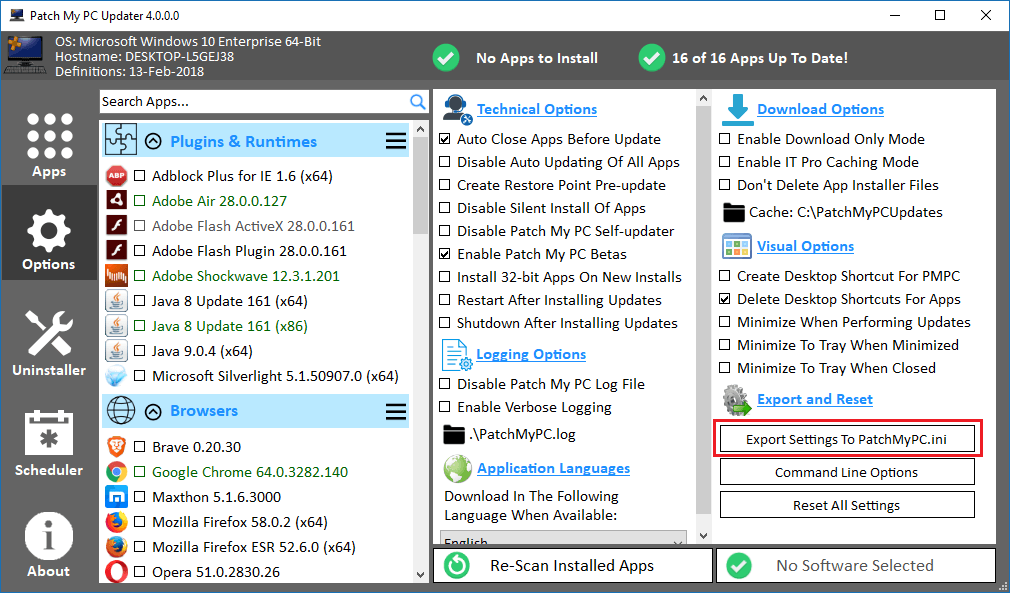
Can I Export The Setting From The Options Menu?
Yes, you can use the “Export Settings To PatchMyPC.ini button in the options menu to export the current settings. This will download and configure a file named PatchMyPC.ini in the same folder as PatchMyPC.exe. If the PatchMyPC.ini file is in the same folder as PatchMyPC.exe, the settings will be configured on a new PC.
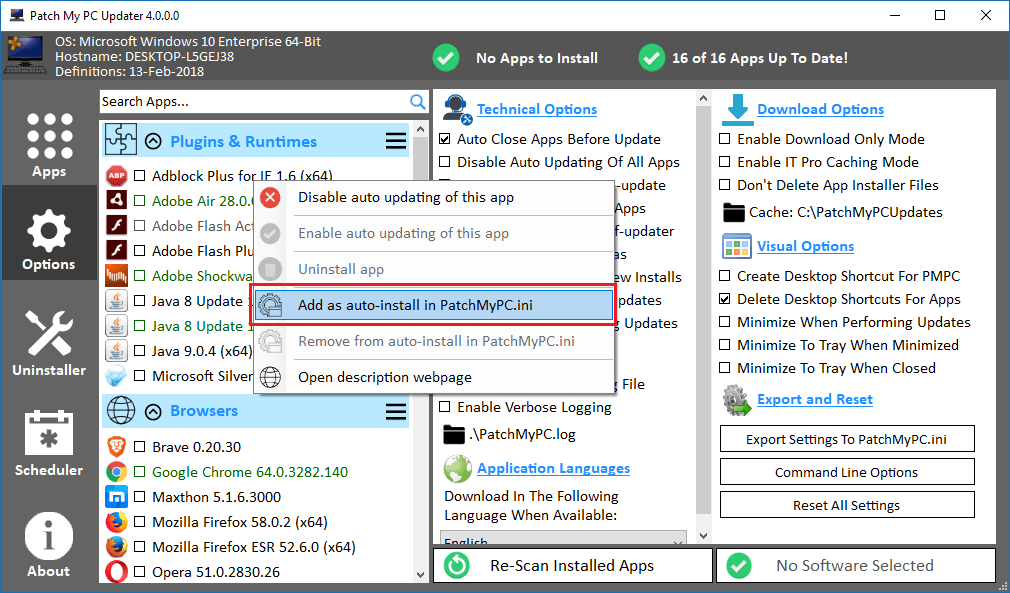
Adding Apps As Auto-Install?
Yes, you can right-click any application and choose the option “Add as auto-install in PatchMyPC.ini”. This will mark the selected applications to automatically install from Patch My PC.
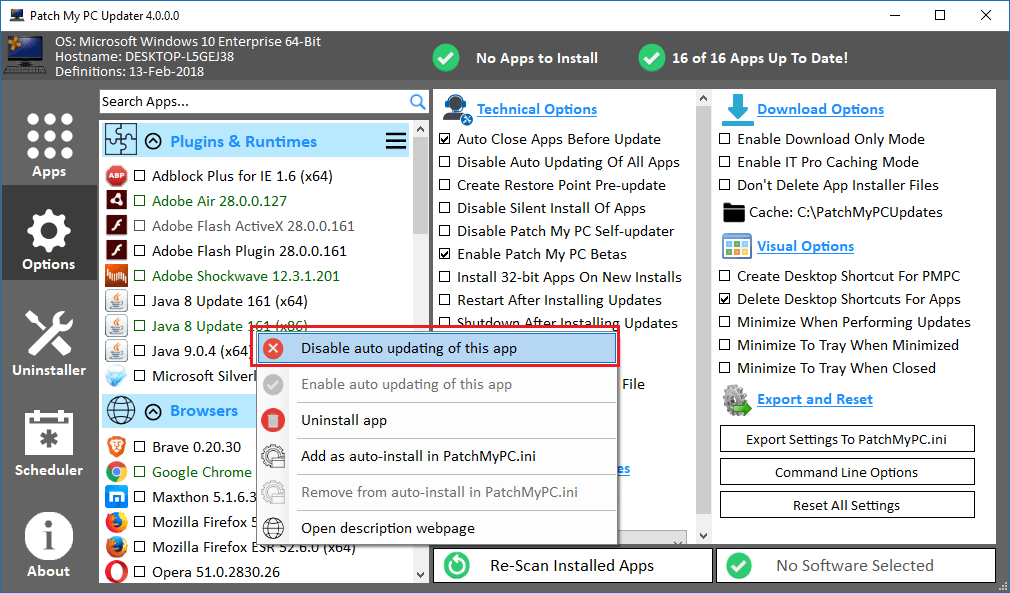
Disabling Auto Updating Of An App?
Yes, in the option panel, you can check any application you want to always skip in the “Don’t Update These Apps:” section.
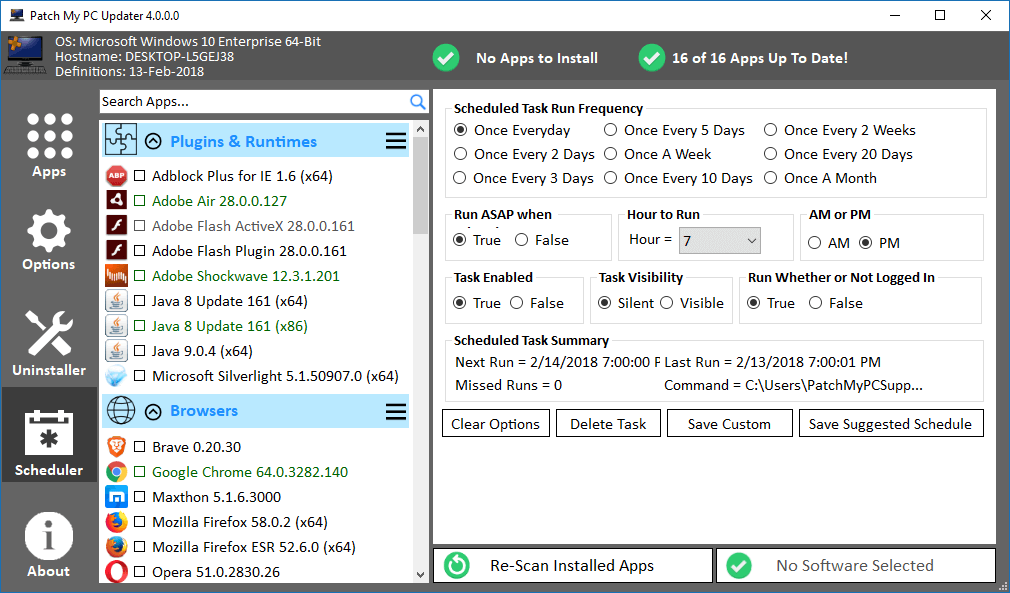
Can Patch My PC Updater Automatically Update Software On A Schedule?
Yes, Patch My PC Updater can be set to run on a schedule and update any outdated applications. Simply go to the Schedule tab and select how often and the options you would like to use.
Does Patch My PC Updater Only Install Outdated Software?
No, you can actually use Patch My PC Updater to install applications even if they aren’t currently install and outdated. Simply check the check box to the left of the application name to install any application even if it’s not currently installed.
How Do I Update Patch My PC Updater To The Latest Version?
What Command Line Options Are Available?
- /s (Will run any needed updates automatically with no graphical interface)
- /auto (Will run any needed updates automatically with a graphical interface)
What Do The Colors Mean?
- Green – means the application is installed and up to date
- Red – means the application is installed but outdated
- Black – means the application is not currently installed
How To Report A Bug / Request Feature
- Create an account on our Support Forum
- Create a new topic on our Bug Board
- Create a new topic on our New Features and Software Board